I launched a batch of articles once that I was sure would pull traffic. Weeks went by. Nothing moved.
The pages were live, I put a lot of time into writing what I believed was really great, and then a few months later, nada. Google acted like they didn’t exist. So I started looking for the reason why, the same one you’re probably here for right now.
Half the SEO crowd will tell you your page won’t rank because your keyword density’s topical coverage map doesn’t match the semantic proximity signals that block your crawl budget’s emotional availability. Whatever that means. The other half will tell you it comes down to backlinks. They’re both wrong in a sense.
And don’t even get me started on what happened when I went down the rabbit hole of Reddit. Here’s the thing; nobody guessing at why your pages or posts aren’t ranking have even checked the variety of factors that decide it.
Every reason below comes directly from my experience from real campaigns, including pages that were buried where people don’t look in search results, or flat-out not even in ’em.
First, Make Sure Google Can Even See the Page
Before you touch keywords or content check that the page is even indexed. A page missing from Google’s index can’t rank for anything.
The fastest check takes about ten seconds. Search site:yourdomain.com/your-page-url in Google, and if the page comes back, congrats! It’s indexed.
Nothing comes back? Welp, then Google hasn’t found the page yet, or something on your site is blocking it. Open Search Console and check the Pages report under Indexing, which lists what’s indexed and what isn’t.
Ahrefs studied around 14 billion pages and found 96.55% of them get no traffic from Google at all. So, don’t forget to submit your sitemap, or you can burn weeks fixing content Google never looked at or cared to in the first place.
Reason 1. A Stray noindex Tag or a Robots Block
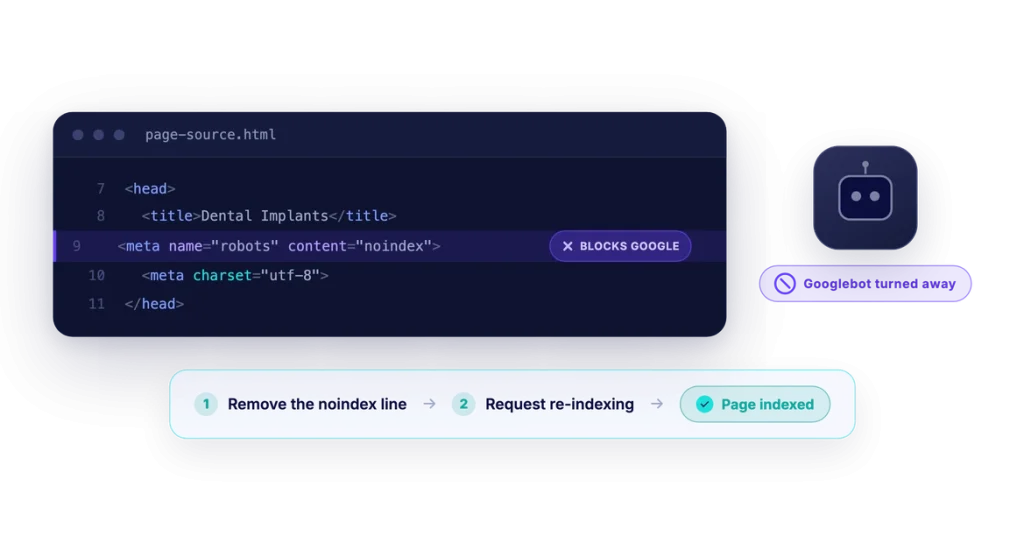
One of the most common reasons a page doesn’t rank is also the most annoying. Somewhere in the page’s code or your robots.txt file, a line is telling search engines to skip it (most common on non-WordPress sites.
Another common reason is that there are a handful of stray noindex tags left over from a staging site, telling Google to ignore the pages. After launching from staging, always double check that the site is not set to noindex. If it was, just fix it then request re-indexing, and the pages should start showing back up within days.
To fix it, look in the page source for <meta name="robots" content="noindex">, and look through robots.txt for blocked directories. Pull out whatever’s blocking the pages you want found, and request re-indexing in Search Console.
You can also use a tool such as screaming frog, or this noindex tester from SiteGuru.
Reason 2. Shallow Content With No Substance
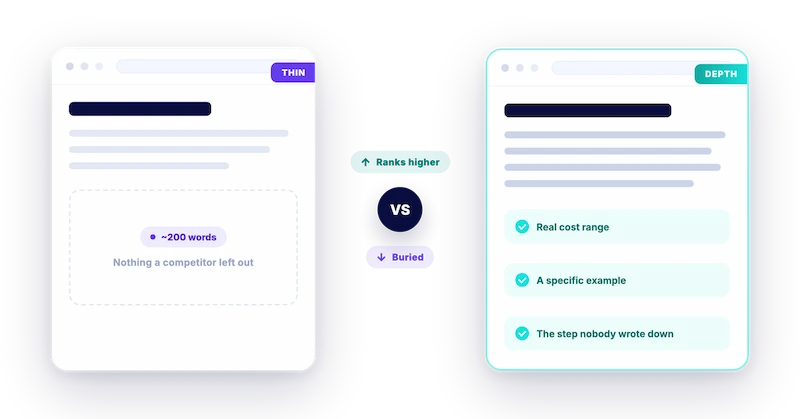
Google rewards pages that match search intent, which usually means depth. A 200-word page with generic advice won’t beat a page that answers the searcher’s real question. When you rush out thin content pages for every service, location, and procedure, you’re likely not going to see much happen. Two hundred words of generic content won’t outrank a competitor who answered the most important questions around the given topic.
But don’t rely on word count alone. A page can run a thousand words and still say nothing a searcher couldn’t find on ten other sites.
What matters is whether it adds something a competitor left out. Also known as content gaps. Here are a list of some of my favorite ways to differentiate my content:
- Cost/pricing
- Specific real-life examples
- Before and after examples
- Common mistakes to avoid
- Comparison tables
- Quotes from experts or clients
- Downloadable PDF or other helpful material
- a step in a process nobody else bothered to write down, a youtube video
- Pros and cons
- Alternatives
Add the details the pages you’re competing against skipped. Depth that serves the reader beats filler that pads a word count.
Reason 3. The Page Targets the Wrong Search Intent
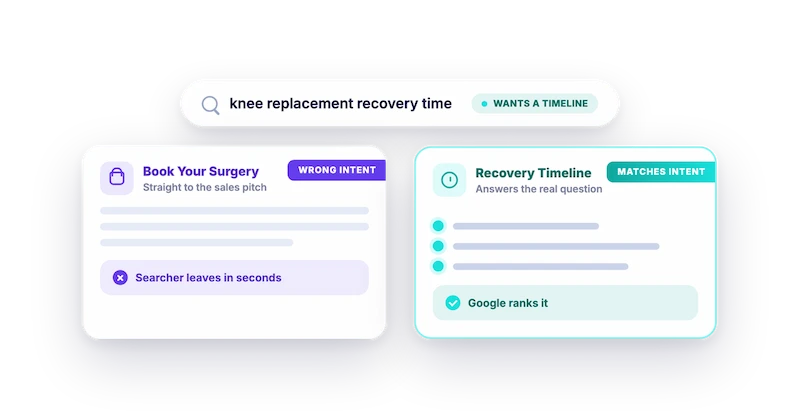
You can write a brilliant page and still not get results if it doesn’t answer the right questions. Search intent is the purpose driving the search.
Someone typing “knee replacement recovery time” wants a recovery timeline. If you target that keyword and immediately once they land on the page it’s just a sales pitch for your surgery, they’re hitting that back button.
When a page chases a keyword whose intent it doesn’t match, Google may temporarily rank it to see how users interact with it, and if the page engagement is poor, it’ll eventually just disappear into the depths of search results.
To make sure this doesn’t happen, just search your target keyword and study what already ranks. Are the top results how-to guides, comparison pages, or service pages? That’ll give you everything you need to know about intent.
Reason 4. Weak or Missing Keyword Targeting
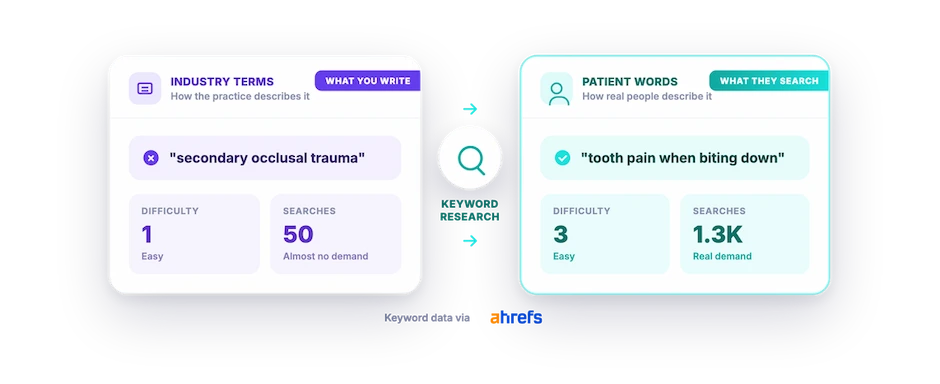
Are you writing in the words your patients use?
For example, if you’re in the dentistry, the term “secondary occlusal trauma” may be a part of your everyday language. Thing is, your target patient isn’t in dentistry. Go with the simple terminology, “tooth pain when biting down.”
If your page never uses the phrases people search, your page will likely rank for the terms that only attract people learning about dentistry, or other dentists to your page. Basically, the wrong audience.
That’s why keyword research is so critical. It reveals how the average Joe describes their problems, which is not always how the industry describes it.
So run your topic through a keyword tool such as Ahrefs or Semrush and write down the phrasing that’s got search volume. Build the page around those words naturally (no keyword stuffing). Our walkthrough on keyword research for healthcare covers how to find the right terms.
Reason 5. Nothing on Your Site Links to the Page
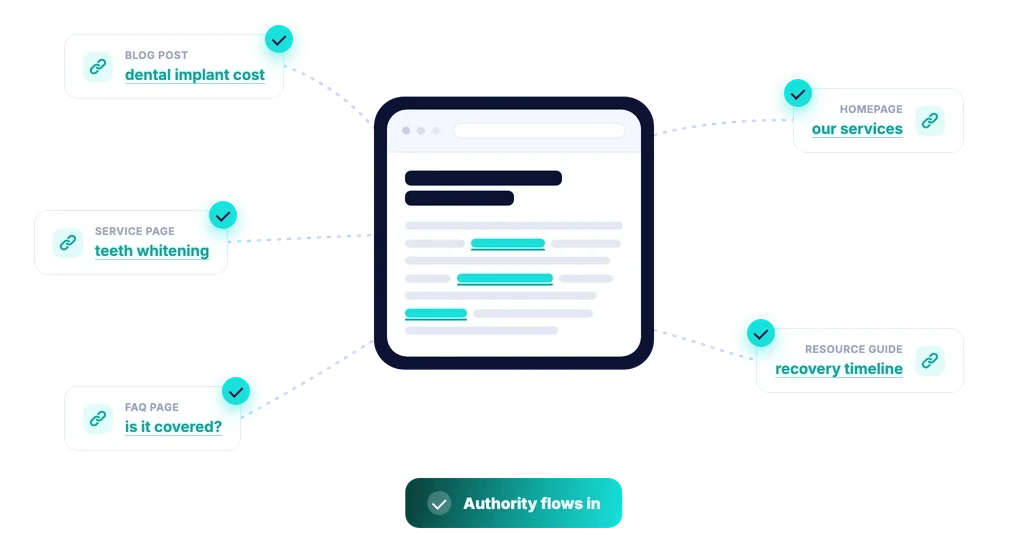
A page with no internal links is left on its own. Google has fewer paths to find it, fewer signals to understand its importance, and fewer reasons to treat it as valuable. These pages are otherwise known as orphan pages. Pages with no other pages using anchor text pointing to them.
It’s one of the most impactful and fastest fixes you can make. If it’s an important page, use descriptive words (3-7) to link to them from your other pages, blog posts, service pages, etc.
A few quick tips on interlinking:
- Don’t use the same anchor text over and over again
- The anchor text should be descriptive enough so that the user knows what page they’re going to before they even click
- Relevancy is key (don’t link to a blog post about cat toys from a product page about dog food)
In short, internal links should guide the reader to the next logical step. Great interlinking answers the question, then points the reader to what they should read, compare, or do next.
Reason 6. The Page Bores People, and Google Notices
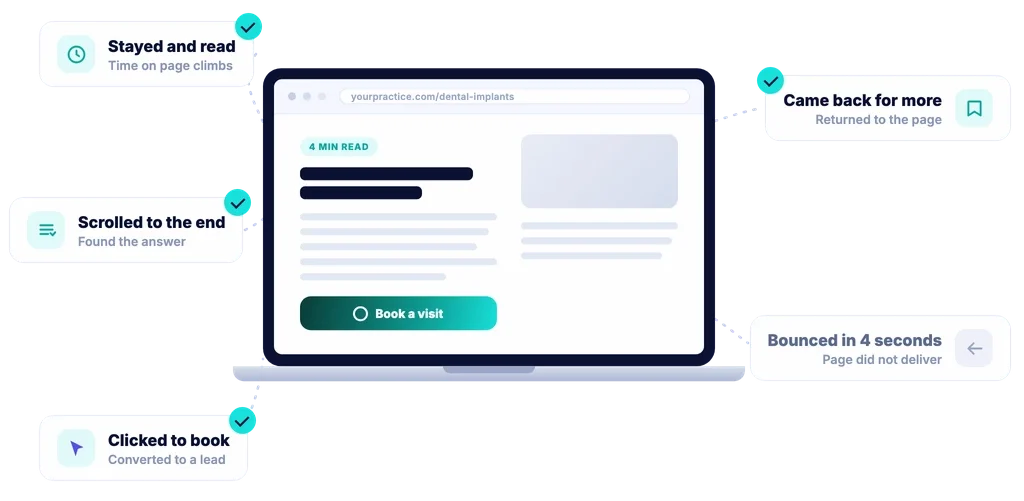
Google watches how people behave on your page. Land on it, hit the back button in three seconds, and that’s a signal the page didn’t deliver. Enough of those and your rankings for that page slide over time.
We had a mental health practice whose service pages were accurate, yet completely lifeless. Heavy on terminology, light on anything a patient came to find.
We added counselor profiles, anonymized examples of situations they’ve helped, with and Q&A sections that addressed pricing, insurance, and other questions that were appointment booking blockers. Time on page went up, and long with that, rankings.
Have someone you know read through the page out-loud to you and have them walk you through their thoughts, confusions, and anything else that pops up while they read. Break up walls of text (6+ sentence paragraphs on paragraphs) and spend time ensuring the page is helpful, engaging, and interesting.
Videos embedded on the page always helps with dwell time. Just think about it, what do you like to interact with and see on a page? That’s what you should add.
Reason 7. The Page Is Too New
Sometimes nothing’s wrong. The page is just too new in a world of pages with a history of engagement and links. This is most common with a brand-new domain. You’ve probably heard it referred to as the “sandbox effect“.
Give it three to six months. That’s a normal stretch before a new page settles somewhere stable. Ahrefs found only 1.74% of new pages crack the top 10 within their first year. A page can be well built and still need months before it earns the trust to of the good ‘ol Google robots.
But “be patient” obviously has a limit. If it’s been 3 months and the page hasn’t budged, that’s your cue to stop waiting and start auditing.
Track your new pages in Search Console. If you’ve got zero movement past the three-month mark, work back through this list.
Reason 8. Slow, Clumsy Pages on Mobile
More than half of all searches happen on phones now. On top of that, Google indexes the mobile version of your site before the desktop one.
Source: StatCounter Global Stats – Platform Comparison Market Share
A page that loads slowly or breaks on a small screen is frustrating to anyone, and your rankings drop right along with their patience.
Run the page through Google’s PageSpeed Insights and that’ll give you an idea of what needs to be fixed. I usually just have my developer take care of it, since fixing things from that report, if you don’t know what you’re doing, can actually break things.
Sometimes though, it’s just that you have multiple images that are multiple megabytes. The simple fix I use for that is downloading the image, dropping it into https://squoosh.app/ with the goal of getting it under 100kb, then replacing the huge image.
Sometimes it’s that you’re on a slow server, and sometimes it’s an incorrectly setup caching plugin that causes layout shifts that make the page look like it’s bouncing on a trampoline while it loads. Research from Google found a mobile page’s bounce rate over doubles as load time goes from one second to ten.
Open the page on a device that hasn’t been to your site before. If you’re waiting too long for it to load, you’re not the only one.
Reason 9. Two Pages Fighting Over the Same Keyword
This one’s easy to miss over time. You publish two or three pages all chasing the same term, and now Google has to pick between them. It usually responds by ranking none of them at all. It’s known as keyword cannibalization.
Search site:yourdomain.com plus your keyword and see which pages turn up for it.
Pick the strongest, fold the overlapping pages into it, and 301-redirect the others there. One clear page beats three muddled ones every time.
Reason 10. Not Enough Links From Other Sites
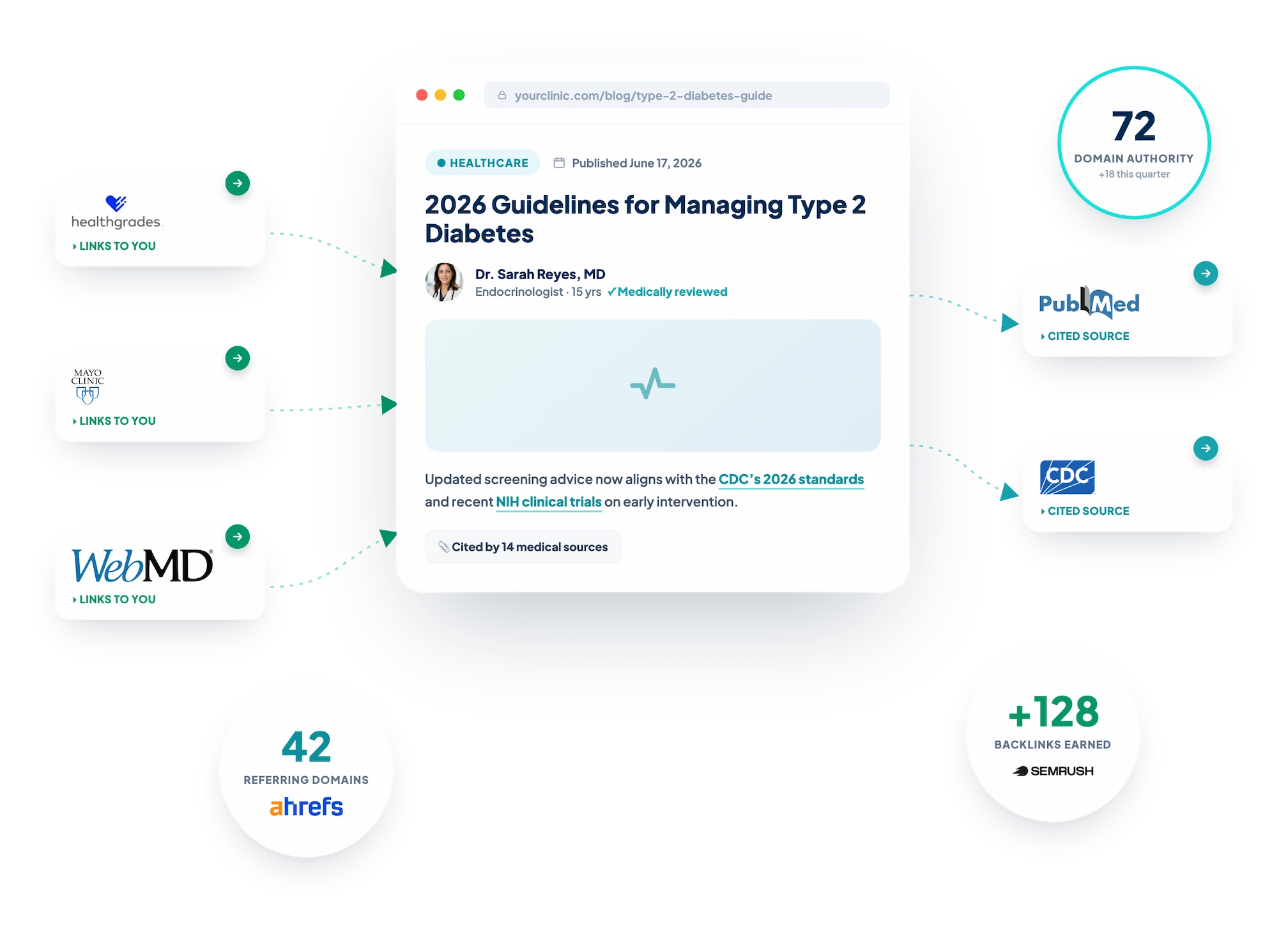
Links from relevant websites are arguably the most important factor to ranking. They tell Google that other people find your content credible enough to point at. For highly competitive terms, typically 1-3 word search terms, a page with no outside links rarely outranks competing pages with links to them.
Write something worth mentioning, like a piece of original research or your own unique thoughts on a subject. The best is when you create content so relatable that other authors reference it in their own writing without being asked.
For a local practice, one mention from the city paper or a partner clinic counts for more than a dozen low-quality links.
Reason 11. A Manual Penalty or a Technical Mess
Once in a while a site won’t rank because Google hit it with a manual action for spammy tactics (see more about that below in reason 12). Other times the cause is purely technical.
Maybe a broken sitemap, server errors, or a migration went sideways and took the URLs with it. So, check the crawl before you blame the page.
Start with the Manual Actions report in Search Console. If there’s nothing there, run a crawl with an audit tool such as Screaming Frog. It’ll catch everything from broken links and server errors, plus the occasional redirect chain nobody knew was there.
A messy structure makes your site hard for search engines to crawl properly. Sort it out and the pages that were stuck usually start popping up in results again. That being said, the Google Search Console report has it’s limits. It only logs manual actions. In short, they’re the penalties a human reviewer at Google applies by hand. So, the bigger algorithmic threat never shows up there…
Reason 12. An Algorithmic Penalty (Silent Site Killers)
When a core or spam update decides your pages are low quality, your rankings drop with no notice and no message. You refresh Search Console looking for an explanation, and the Manual Actions report sits there empty. The drop hurts, a lot. It can literally pull all the rankings of every page and post on your site down.
I learned this one the hard way. A few years back I got excited about AI and programmatic SEO. I published hundreds of templated pages in a few weeks. Traffic shot up, stayed steady for nearly 6 months, then slid fast. And I mean, FAST. I watched my entire site drop from 15,000+ keyword rankings to 72 in 4 months. Yeah, OUCH.
I checked Search Console first, and the Manual Actions report came back clean. No warning, no email, nothing to file a reconsideration request against. What had hit me was Google’s scaled content abuse policy, the algorithmic version that sends no notice at all.
The fix was painful. I pulled the pages down, set them to 410 deleted, re-submitted my sitemaps, and twiddled my thumbs as I waited for the next update to reassess the site.
A handful of these types of demotions show up nowhere in your dashboard. Scaled content abuse is unfortunately the one that caught me. Hundreds of templated pages built for search engines can get a whole site flagged as spam. I was annoyed since I put so much time into actually ensuring there was depth and quality to the content. But that wasn’t enough.
Google applies that label no matter how the pages got written, by a person, an AI tool, or a mix of both. In my situation, it was a solid mix (I did not publish a bunch of AI content spam, which is why this annoyed me so much).
A broad core update can do the same damage when it reads your site as unhelpful. Since the Helpful Content system folded into core ranking in March 2024, one sitewide quality call can lower even your strongest pages.
The link spam system works the same way, discounting shady backlinks with a demotion you can’t see anywhere. Expired domain abuse and site reputation abuse are also on the list, where borrowed authority gets a whole site reassessed.
So how do you find a penalty with no report? You stick with SEO best practices, and stay up-to-date with Google guidelines and understand algorithm updates.
If you’ve got rankings crashing, determine the date of when it started happening to see if it matches a core or spam update. That’s how you’ll know the cause is algorithmic. A technical crawl won’t show it, because nothing on the page is broken. From there the job is cleanup. Fun!
Cut the thin and templated pages, raise the quality of what’s left, and give Google a cleaner site to judge. Recovery lands on the next update cycle, which can take weeks or a couple of months, so patience is part of the fix.
How You’ll Know It’s Working
Don’t fixate on ranking number one. It’s rarely the most useful signal of progress anyway.
When these fixes start working, organic traffic to the page goes up first. Bounce rate typically drops too as visitors are finding what they came for.
Click-throughs from the search results tick up. Your rankings for the target terms follow.
Just remember, SEO isn’t something you fix once and walk away from. A plugin update gone wrong, competitors getting ahead, an algorithm update, etc. can all scramble your traffic overnight. It’s constant work.
I follow Search Engine Journal, Search Engine Land, and Google’s own Search Central blog. You don’t have to read all of it. Skim it and watch for the updates that move rankings.
Get a Read on Your Own Pages
If you’ve worked through this whole list and your site still won’t rank, the problem’s usually hiding somewhere deeper that requires years of experience digging for the issue.
That’s what my team does every day. We’ve run SEO campaigns since 2016, and the reason a page stays buried is not always simple. Sometimes it’s over a dozen things that need to be addressed site-wide. Your best content shouldn’t stay invisible.
If you’d rather have a team find and fix the cause, our healthcare SEO services start with that audit.
Medical practices face a second layer of rules on top of these fixes, which we cover in our guide to what healthcare SEO is.
We can help audit your site, find what’s holding the pages down, and start working to get your site back to the top. Reach out for a personalized SEO analysis and we’ll let you know if we can help or not. The pages you’ve already written are worth more than you think. They just need to be found.