Your practice can have the best physicians in the county and still lose patients to the clinic down the street. That clinic holds a map pack spot, and Google serves those three profiles above every other result when someone searches “dermatologist near me.” Google Business Profile optimization is how you claim one of those three spots.
We manage profiles for healthcare practices every day at Direction, and the ones getting the calls all run their profiles the same way. Here are the 15 things they do.
What Is Google Business Profile?
Google Business Profile (formerly Google My Business) is a free local listing on Google’s search network. The profile puts your practice on Google Maps and in local results. Its like an online brochure of your business categories, services, hours, photos, reviews, and contact information.
A well-built profile is direct local SEO ranking factor. Three reasons it requires serious focus if you want to leverage it as the golden child of your sales pipeline:
- Position. Your GBP is right above the organic results. People look and click there more than anywhere else on the search results page.
- Intent. People searching “pediatrician near me” want an appointment, and soon. A map pack spot puts you in front of patients right when they need you.
- Trust. Each listing shows ratings, reviews, hours, and photos. Patients compare three practices side by side. Then they call one.
How Google Ranks Profiles
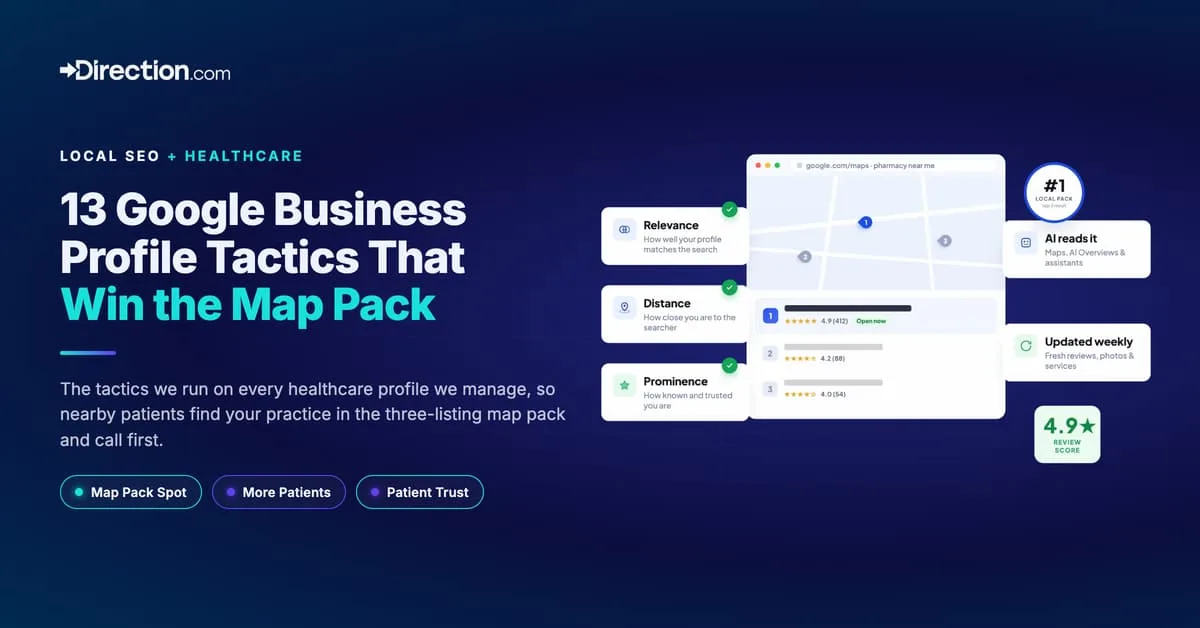
Google ranks profiles on three factors:
- Relevance (how well your profile matches what the searcher typed. Google judges that from your categories, services, and description).
- Distance (how close your practice location is to the searcher).
- Prominence (how established your practice is. Google reads reviews, ratings, photos, links, and how complete the profile is).
The 15 tactics below all work on relevance and prominence, the two factors you have full control over.
Setting Up Your Google Profile (If You Haven't Yet)
Already verified? Skip to the tactics.
New profiles face a harder gate than they used to, because video verification is now the default for most new listings. A failed attempt stalls the profile for weeks, so build your proof before you create it.
1. Don’t start with Google.
Create your listings on Yelp, Facebook, Healthgrades, and your state directory first. Google built the stricter process to catch fake listings, and a practice with no footprint anywhere else looks like one.
2. Put your full NAP on your website.
Name, address, and phone in the footer and on your contact page, formatted exactly as you’ll enter them in Google. A practice Google can confirm across the web is a practice Google can trust.
3. Sign up with an email on your business domain.
A gmail.com address managing a medical practice invites extra scrutiny.
4. Match the profile to your signage before you record.
Google’s video verification requirements call for a visible business name, the nearby area, and proof you operate there. A profile that says one thing while the door says another gets rejected.
5. Film one continuous take.
Street signs and neighbors first, your signage second, then proof you run the place, like keying into the office. Google reviews the video within five business days. Ensure you DO NOT have anyones faces, not even your own in the video, as that will get your verification to fail.
6. Say YES when Google asks if you have a location patients can visit.
Choosing “no” labels you a service-area business, and that label makes local rankings much harder to win.
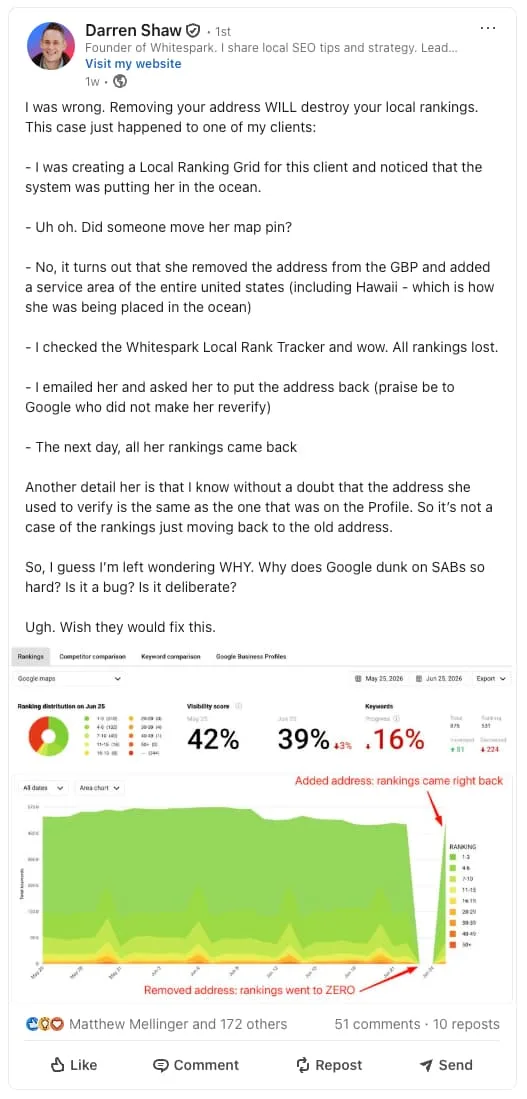
7. Add service areas only if you treat patients beyond your office.
Up to 20 of them, and keep the boundary within a two-hour drive.
The Importance of Google Business Profile for Map Rankings
Google’s Map Pack, also known as the Local Pack or Local 3-Pack, is the three-listing block with a map at the top of local search results. Here’s some eye-opening data you can’t ignore:
- The top three take the clicks. For local queries, 42% of searchers click a result inside the map pack, per Backlinko data. SOCi’s research found 3-pack businesses pull 126% more traffic and 93% more actions than businesses ranked 4 through 10. Actions means calls, website clicks, and driving directions.
- Local searches end in visits. Nearly half of all Google searches (46%) carry local intent, and Semrush counts 800 million “near me” searches every month. Google’s May 2016 US study looked at nearby searches on phones. Among its nearby-search participants, 76% visited a related business within a day. A purchase followed 28% of those searches.
- Trust and Credibility: Each listing shows your name, hours, reviews, and rating, so customers judge you before they tap. Google’s own data says customers are 2.7 times more likely to consider a complete profile reputable and 70% more likely to visit. SOCi found raising your average rating by one full star improves profile conversions by 44%.
15 Google Business Profile Optimization Tactics
Here’s the top 15 actions we take on every healthcare profile we manage.
1. Choose The Right Primary Category, and sub-categories
Sounds simpler than it is. But, Google lets you pick up to five categories. Fill four or more and you beat the practices that stop at one. Your primary category should name your specialty (“Dermatologist,” “Dental Clinic”), and secondary categories cover adjacent services (“Medical Spa,” “Cosmetic Dentist”).
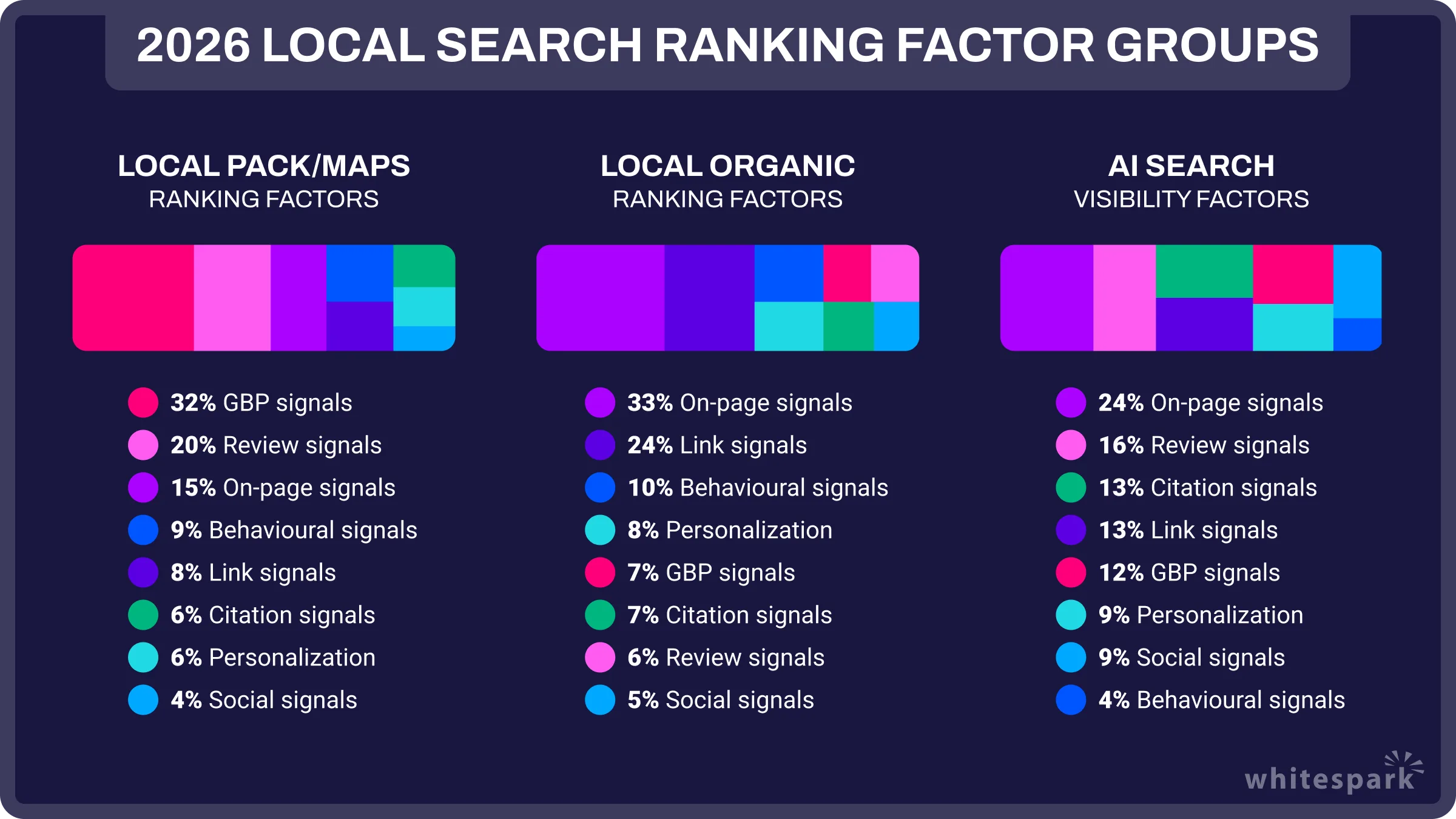
Whitespark’s 2026 data on local rankings rates the primary category as the top local pack factor you control. The same survey puts a wrong primary category at No. 2 on its negative factors list.
Categories decide which searches you can appear for and which attributes you can display. A wrong category pulls the wrong traffic, and your rankings for real services go down with it.
2. Write a Description That Names Your Specialty and City
Google gives you 750 characters. You don’t need all of them. You need five things.
- Accuracy. Say what you treat, without clinical speak.
- Audience fit. What you do, for who.
- Keywords. Naturally work in the terms you want to rank for. No stuffing.
- Why you? Same-day visits, twenty years in practice, bilingual staff. Give patients a reason to pick you.
- Clean copy. A typo in a medical brand’s description is no-bueno.
3. List Every Service You Offer
Add each service with a title, price or price range, and a short description. Service listings expand the searches you appear for, and service searches carry high intent. A patient typing “botox injections near me” is far closer to booking than one typing “what is botox.”
Sterling Sky’s services ranking test found adding services can move rankings for the matching keywords, with the effect varying by industry. Fill in Google’s predefined services for your categories, then add the custom ones Google leaves out.
Google matches these listings against what patients type, so the profile listing “sedation dentistry” can show up for “sedation dentist near me.” Offer a service without listing it and Google has no way to connect you to that search.
4. Add Products (If You Sell Them)
Of the 500+ GBP’s we’ve audited, the products section is empty on on 90% of them. Sell skincare lines, supplements, dental appliances, or devices? Add them as products with a photo, price, description, and link.
Start with your top sellers. Build the menu out over time.
5. Fill Out Your Attributes
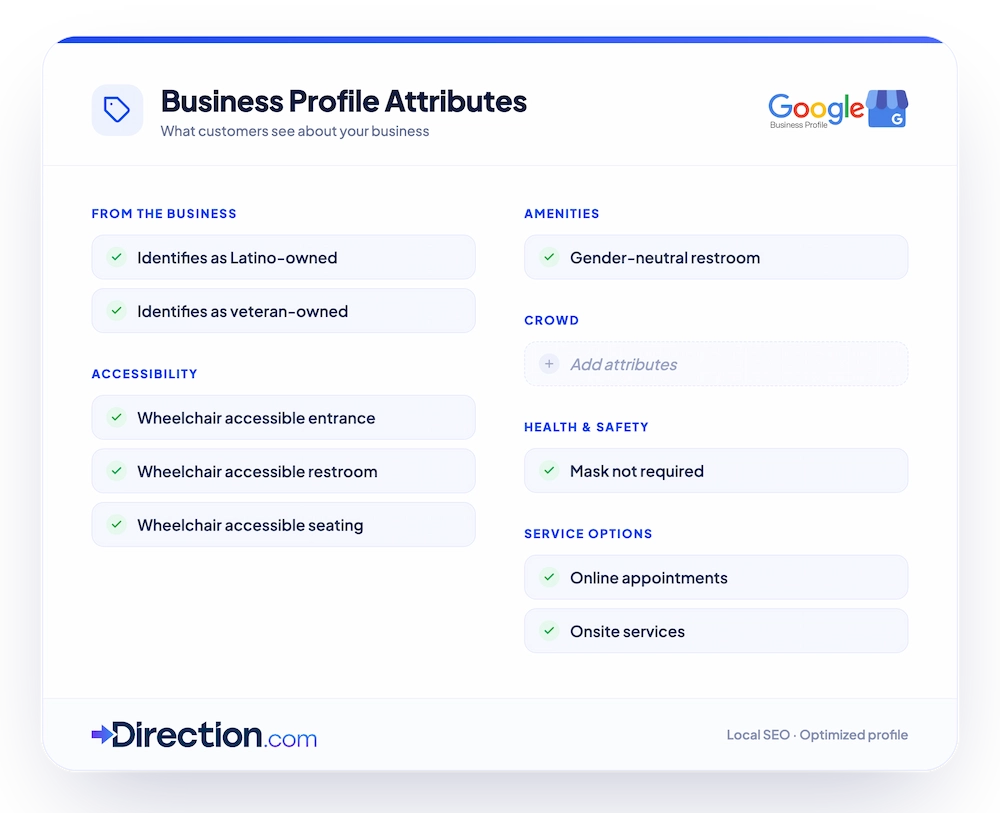
Attributes answer patient questions before the phone rings. Wheelchair-accessible parking and restrooms, appointment links, if you require appointments, LGBTQ+ friendly, women-led. Your available attributes depend on your categories, so set categories first.
Full attribute sections give Google more to match against. Google likes listings that let users decide without leaving the page.
Google’s own research shows that customers are 2.7 times more likely to consider a complete profile reputable and 70% more likely to visit.
6. Post More Photos Than the Practice That Outranks You
Do photos push rankings directly? Google won’t say. Its own tips to improve your local ranking recommend adding photos, then the ranking breakdown on the same page names reviews, ratings, and links.
The correlation data leans yes anyway. Localo’s analysis of 2 million profiles found businesses in positions 1-3 average 250-plus photos, while positions 4-10 hold fewer than 200. Busy practices collect photos regardless, so the honest read is a strong lean.
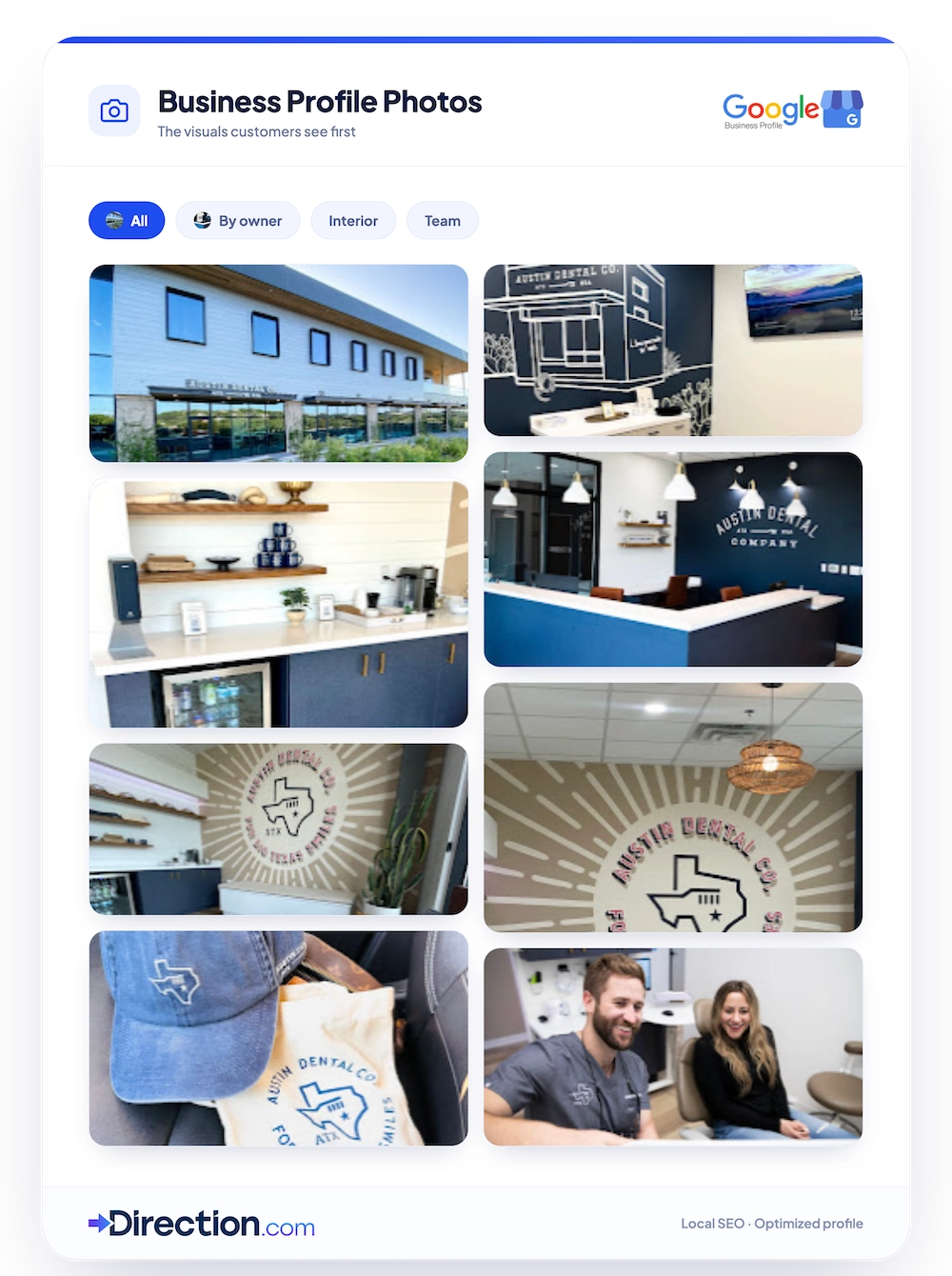
Where photos pay off beyond debate is the moment after ranking, when a patient compares three listings and calls the one they can see inside.
Here’s the tactic we work into every client: Pull up the three practices in your map pack. Count their photos by type/category, then post more in each.
At minimum you need a cover photo, your logo, exterior shots, and interior shots. Then keep adding new photos monthly, even one at a time.
A gallery last updated in 2022 makes patients wonder if you’re still open.
7. Add Video
Video shows up on healthcare profiles even less often than products do, so a little effort here puts you ahead of the whole map pack. Wyzowl’s 2026 video survey found 89% of consumers say video quality shapes their trust in a brand, and trust is the whole sale in healthcare. A 30-second office walkthrough, a physician intro, or a procedure explainer lets patients tour the office before they call.
Give each video a clear title so Google knows what it shows. During audits, check that older videos still represent the practice.
8. Publish Three to Five Questions and Answers
The Q&A section lets you answer common patient questions right on the profile. On the healthcare profiles we audit, the section usually sits empty. Source questions from patient reviews, your site FAQs, and your front desk staff (the Searches Breakdown in your profile insights helps too).
Keep links out of your answers, since Google favors answers that keep users on Google. And check what the public has posted, because patients can answer questions on your behalf. When their answer is wrong, post the correct one.
9. Get New Reviews Every Week
Reviews drive prominence more than any other single input. GatherUp’s survey of 1,000-plus US adults found 67% of consumers weigh review recency over star ratings. Over 99% consult reviews before choosing a business.
No trick exists for getting them. Give patients an experience worth writing about, then ask.
Share your review link at checkout, in follow-up emails, and in post-visit texts. The link is in your profile dashboard under “Get More Reviews.”
Respond to Every Review
Getting reviews is half the work. Respond to all of them. Positive, negative, and star-only.
For negative reviews, reply publicly with care, then move the conversation offline with a private contact. You’d be surprised how often a one-star review turns around once the patient feels heard.
10. Post to Your Profile Weekly
Google posts reach people who already found your profile, so they’re deep in the decision. Offers, updates, events, and service highlights all work here, and selling directly is fine.
Our posting rules. One strong image or video, short text, a keyword where it fits, and a clear call to action.
Re-run your best performers. The full system lives in our Google Business posts guide.
One update worth knowing. Google retired profile chat in July 2024, so guides still pushing the messaging feature are out of date. Use appointment links and your tracked phone number as the contact paths.
11. Reinforce the Profile With On-Page Signals
Your website should point back at your profile. Put your practice address in your site footer and contact page, matching the profile format exactly.
Serve multiple cities with location pages? Embed your profile map on the matching page.
Matching signals tell Google the profile and the site describe the same business. Confirmed matches climb faster in local rankings. Whitespark’s 2026 report has on-page signals climbing again, with website quality carrying the strongest weight in local organic rankings.
12. Keep Hours, Pin, and URL Current
Hours are now a ranking input, and Google has confirmed it uses openness in its local ranking systems. BrightLocal’s 50-business opening hours study tracked 10 business categories and watched local rankings drop when businesses closed for the day.
Three small checks that cost patients when they’re wrong.
- Hours. A patient who drives to a closed office doesn’t come back. When hours change, update the profile, your site, and your other listings the same day.
- Map pin. Search your practice on Google Maps and confirm the pin sits on your entrance. A pin off by a parking lot sends patients wandering, so adjust it manually if needed.
- Website URL. Confirm the link works and uses https. Thirty seconds, once a quarter.
13. Sync Your Other Listings
Google checks your profile against your other listings, from Bing Places and Apple Maps to Yelp, Healthgrades, and Facebook. Mismatched NAP data erodes trust. If your profile says “1200 Main Street” and three directories say “1200 Main St.,” pick one format and apply it everywhere.
The AI engines raised the stakes here. Whitespark’s 2026 report added an AI visibility category, and citation-based signals fill three of its top five spots. SOCi’s 2026 Local Visibility Index found only 68% of business contact info on ChatGPT and Perplexity matches the Google profile.
A listing management tool covers dozens of directories from one login. The fastest way to fix mismatches at scale.
Have Your Google Business Profile Managed By Local Rankings Experts
Clearly, Google Business Profile is one of the best ways for local businesses to reach new customers who are using Google Search and Google Maps to find products and services in their area.
But Google Business Profile alone isn’t always enough to dominate “near me” searches.
Why?
Well, because customers are using tons of different resources to shop locally. While most are using Google, others are using Bing, Yahoo Local, Apple Maps, Facebook, Cortana, Alexa, NextDoor and dozens more. Having a business profile on all of these networks is the best way to ensure you’re reaching customers when they’re on the digital hunt for the services you offer.
Now, you might be thinking, “if setting up a GBP is this intensive, how will I find the time to setup and manage dozens of business profiles?” Surprisingly, the answer is simple (and so is the solution).
Want specialists to run the whole system? That’s what we do. Talk to our healthcare SEO team and we’ll walk you through which of the 14 checkpoints your profile fails today.