Building or rebuilding a practice website is the kind of project where good is hard to define until you’ve seen a few done.
I’ve been a part of easily at least 140+ of these launches over the last decade. The site builds that result in significant increases in keyword rankings and traffic tend to share the same short list of features.
I’ve noted all these things down, integrated them into our own SOPs, and ensure it’s what each of our clients get with a new site.
Take this guide and do with it what you will. Enjoy!
1. Design a Website Your Target Audience Can Instantly Trust
Website visitors make decisions in roughly 5-6 seconds.
They land on the homepage, scroll down a bit, and ask one thing (whether consciously or subconsciously): Do I trust this company?
A stock theme that 4,000 other brands already have or that looks like it was made by some low-cost overseas company usually can’t answer that.
And a redesign that looks too close to the competitor site they just visited doesn’t help either.
Oh and please, for the love of cats, do not use AI site builders.
Your new website build should start from a custom information architecture. A hero section, copy that matches your target audience’s intent, services that are super simple to click through to, provider credentials, reviews, and a simple, obvious call to action (CTA).
Skip the custom step, grab a template, and you save four thousand on the build line. Then you lose forty to seventy new patients a year to the practice across town whose site loads in 1.4 seconds and reads cleaner. The math on that trade rarely works in the template’s favor.
I may be slightly biased here, but what I’m about to tell you is true and you already know it.
Your website is your company’s most valuable asset. Even if you rely purely on referrals, guess what? Those referrals will still look at your website before reaching out.
Go Cheap (if you don't want to grow)
Skip the custom step, grab a template, and save four thousand on the build line. Then you lose forty to seventy new patients a year to the practice across town whose site loads in 1.4 seconds and attracts patients better. The math on that trade rarely works in the template’s favor.
I may be slightly biased here, but what I’m about to tell you is true and you already know it.
Your website is your company’s most valuable asset. Even if you rely purely on referrals, guess what? Those referrals will still look at your website before reaching out.
A Note For Healthcare Practices
ADA Title II compliance hit in May 2026 for healthcare organizations that receive federal funds. Your build has to meet WCAG 2.1 Level AA. Here’s what that covers.
- Image alt text on every image
- Full keyboard access to every menu and form, no mouse required
- Color contrast above 4.5:1 for body copy
- Labeled form fields
- A clean heading hierarchy
You should ensure you get a compliance report at launch.
2. Website Speed, Performance & Usability
Besides having an impressive look and feel, your site should also be fast and easy to use.
Pingdom and GTmetrix are handy as a second opinion. The metric Google uses to rank your pages is Core Web Vitals. It comes down to three numbers.
| Metric | What it measures | Target |
|---|---|---|
| LCP (Largest Contentful Paint) | When the largest visible element finishes loading | Under 2.5 seconds |
| INP (Interaction to Next Paint) | How fast the page responds to a tap or click | Under 200 milliseconds |
| CLS (Cumulative Layout Shift) | How much the page jumps around as it loads | Under 0.1 |
Let your new web company know you’ll be testing your site with these tools.
If your website scores high in Google’s test, loads under 2 seconds in Pingdom and gets A’s and/or B’s in GT Metrics’s test, congrats!
Google still indexes AMP pages under the same standards as other web pages. You can build a mobile-friendly site without AMP.
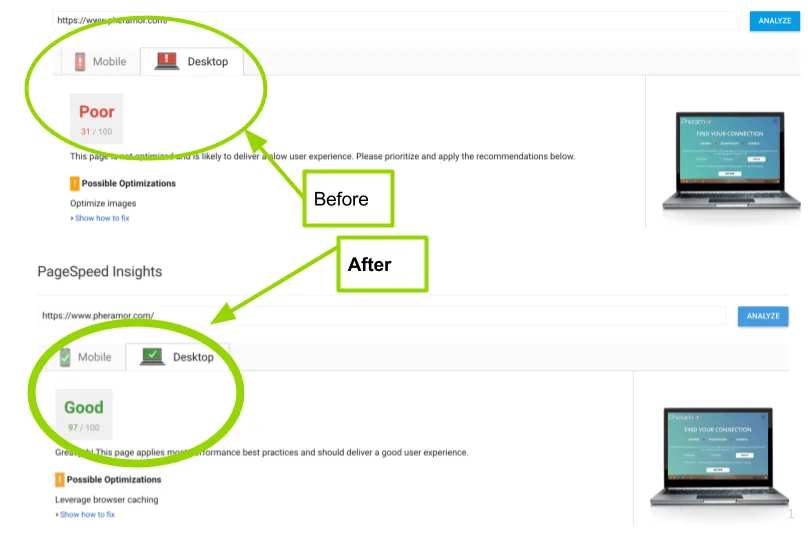
Any person who visits your website should be able to navigate around to the other pages of your site with ease. There should be precise navigation, menus, call to actions and links that guide the website visitor to take the steps you desire. Remember, the bottom line to having a website is to increase your bottom line.
3. Great Copywriting
Your website should pre-sell your customers instead of just selling to them. In other words, your website should provide the relevant information that teaches, educates, informs and gives people confidence in their decisions with your company.
But you don’t want paragraphs all over the place, that’s for your blog. If your new web company can’t write great sales copy for your new site – it may be time to look for one who can provide full website services.
Give your customers confidence in you and your business. Ensure you have trust icons, customer reviews, awards, and partnerships displayed on your homepage. Also, be open to conversion – request a chat feature on your site!
Your new site should romance visitors into wanting to buy from you by creating trust, authority, and respect. This way, these people will become your buyers, repeat customers, and best advertisements for your business.
Talk about great copywriting.
4. Write Website Copy That Pre-Sells
In line with copywriting, your website should have excellent content. All the articles on your site should be engaging, accessible to read, free from jargon (and if any, it should be explained), informative and educative. The content should describe your products or services in a way that shows the website visitor the benefits of your products or services.
It should enlighten the website visitor on why they need your products or services. Simply put, your website content is what helps your potential customers gain trust in your brand. You should also combine articles with videos, photos, and infographics.
5. Get Found: Search Engine Optimization
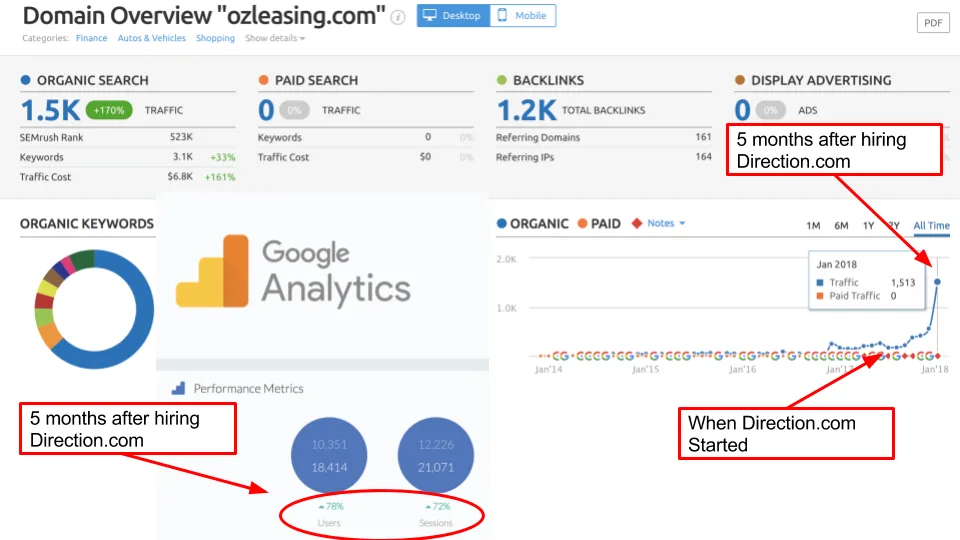
Your new site needs to get found. Your site needs SEO. I shouldn’t even go into this – it’s dead simple. Don’t dump money into a new website and then do absolutely nothing to get it seen. For best results, always work with a web company who is primarily an SEO agency.
Why? Well, not doing so is like going to an auto shop to get new tires – and they just give you the new tires and tell you they don’t actually know how to install them, you’ll have to go somewhere else for that.
Now you’re stranded at the “tire shop” with new tires and no way to put them on. You call around, and the other tire shops tell you that the new tires you just spent all this money on, aren’t even safe – they recommend you just get new tires completely. I’m sure you can imagine the rest so I’ll just get on to some of the basics things you should ensure of in your new sites SEO.
The website should have on-page optimization. Proper URL structure, Title tags, Meta Descriptions, Alt text, keyword density checks, content (You don’t want to get slapped by Google with a thin content penalty), and the list goes on. Schema.org is also something you should have. Scratch that, you need it. It helps search engines understand your site and what you do. This, in turn, helps organic rankings. It also allows your site to have cool features in search results.
6. Responsive Design
Your site should be mobile-friendly. You’re probably thinking “Duh, everyone knows that.”
An actual web design & development company will be up-to-date with the latest tools and technology.
AMP stands for Accelerated Mobile Pages. It remains an option for building web pages, but your site doesn’t need AMP to work on mobile.
Here’s a quick rundown: About 5-6 years ago, Amazon released a study saying that a 1 second lag in load time could cost them $1.6 billion in sales.
The internet was scrambling to speed sites up. Facebook came out with Instant Articles, Google & Twitter came together and released AMP Project.
The idea is simple: create a way to deliver users what they’re looking for in the absolute shortest amount of time possible.
7. Social Media Integration
How does someone who’s never heard of you decide if they want to do business with you?

You guessed it: They try to find out if you’re a trustworthy company. Maybe they’ll check reviews people wrote on different sites online. Perhaps they’ll ask their friends.
One thing they will do is check your social profiles. Hopefully, you’ve been actively growing your social media or paying someone to do so.
Say a company has 21 Facebook likes, and their Facebook page has no pictures except for their logo – I don’t care what the Google or Yelp reviews say, I’m not giving that company my credit card info.
Speaking of which, let’s move onto the last topic, which happens to be a critically important topic.
8. Security
Whether or not you sell items on your website – if you take any information whatsoever, you should have SSL.
Also, make sure you’re on a dedicated server. Don’t go looking for the cheapest hosting package (usually it’s called “shared hosting.”) This is something your web company should be able to help you with.
Remember how I hit on the importance of your website speed in #2 and #6? Well, I’ll mention it again.
On dedicated hosting, there’s a 99.9% chance your website will load faster than it would on shared hosting. I use Amazon Web Servers (AWS), but there are plenty of others out there to choose from.
There are more benefits than just speed though. Shared hosting presents a plethora of other risks such as you could be on the same i.p. as porn sites or spam sites. Unfortunately, many people have experienced drops in rankings and ultimately drops in business because of this.
Just as you wouldn’t purposefully build your new business on some street corner that you’ve heard “May or may not be swarming with crime,” you shouldn’t put your website on shared hosting.